Ask one agent to "build me a waitlist app" in a single prompt and you'll watch a demo fall apart the moment the app is non-trivial — there's no way to plan, recover, or integrate. The fix isn't a better prompt; it's a better plan. That plan is a task graph.
Why one prompt doesn't scale
A single prompt asks one agent to hold the whole project in one context and do it all at once. That context drifts, a mistake halfway through poisons the rest, and there's no way to run independent pieces simultaneously. Real builds need structure, not a longer prompt.
What a task graph is
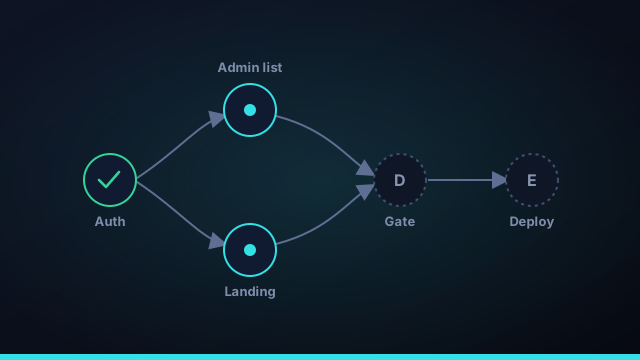
A task graph decomposes the build into discrete tasks with explicit dependencies. "Set up auth" must finish before "gate the admin list," but "style the landing page" can run alongside both. Written down, those relationships form a directed graph — an ordered, dependency-aware plan.
Dependencies enable parallelism
Here's the unlock: once you know what depends on what, you know what doesn't. Anything with no unfinished prerequisites can start now, in parallel, without stepping on anything else. The graph turns "do everything in order" into "do everything that's ready, at once."
The task graph is the real innovation. Planning the work as ordered, dependency-aware steps is what makes parallel agents safe.
The scheduler
A scheduler walks the graph and launches every task whose dependencies are satisfied — up to a safe concurrency cap — each in its own isolated worktree. As tasks finish and merge, new ones become ready and start. It's the same idea a build system uses, applied to agents instead of compile steps.
Failure and recovery
Because the work is granular, failure is survivable. A task that fails its verify gate is retried a few times; if it still can't pass, it stops and lands in review with its history, while unrelated branches of the graph keep moving. One bad task doesn't sink the build.
One prompt is a wish. A task graph is a plan agents can actually execute — in parallel, and with a way back from failure.
A task graph by example
Picture building a waitlist app. A flat prompt would say "build me a waitlist app with email capture and an admin list" and hope. A task graph breaks it into nodes with dependencies: scaffold the project comes first; then set up the database and build the landing page can run in parallel because neither depends on the other; email capture depends on the database; the admin list depends on both the database and auth; and deploy depends on everything passing. Drawn out, that's a directed acyclic graph — and the moment it exists, a scheduler can run the landing page and the database setup simultaneously while auth proceeds, instead of marching through one long list. The structure is what makes the parallelism both possible and safe.
Task graph vs a checklist
A checklist and a task graph look similar but behave very differently. A checklist is ordered and linear: do this, then this, then this — no information about what could happen at the same time, and a single failure stalls everything after it. A task graph records dependencies, not just order, which gives you two superpowers a checklist can't. First, parallelism: anything with no unfinished prerequisites can start now, so independent work runs concurrently. Second, fault isolation: when one task fails, only the tasks that depend on it are blocked — unrelated branches of the graph keep moving. For AI coding agents running in parallel, that difference is the line between a build that recovers gracefully and one that grinds to a halt on the first error.
How task graphs get built
You don't draw the graph by hand. In an autonomous build loop, a workspace manager reads your goal and decomposes it into discrete tasks with dependencies — essentially planning the work as a graph before any coding agent starts. From there a scheduler walks the graph and launches every task whose dependencies are satisfied, up to a safe concurrency cap, each in its own isolated git worktree. As tasks finish, pass their verify gate, and merge in dependency order, new tasks become ready and start. It's the same idea a build system like Make uses to parallelize compilation, applied to agents instead of compile steps. Command Fleet plans and runs exactly this graph for you, which is what lets it take one sentence to a built, reviewed, and deployable app.
Key takeaways on task graphs
- One prompt doesn't scale. A single mega-prompt can't plan, recover, or integrate once the work is non-trivial.
- A task graph records dependencies, not just order — which is the information needed to parallelize safely.
- Dependencies enable parallelism. Anything with no unfinished prerequisites can start now, in its own worktree.
- Failure stays contained. A failed task blocks only its dependents; unrelated branches keep moving, and it routes to review.
- You don't draw it by hand. A workspace manager plans the graph from your goal and a scheduler walks it.
The task graph is the quiet innovation behind every credible "one sentence to an app" claim. It's what lets Command Fleet's autonomous build loop run many AI coding agents in parallel and still produce something coherent, reviewable, and deployable.
Frequently asked questions
What is a task graph?
A task graph breaks a build into discrete tasks with dependencies between them — an ordered, dependency-aware plan. It records what must finish before what, which is exactly the information needed to run independent work in parallel.
Why decompose a build into a task graph?
One giant prompt can't plan, recover, or integrate. Decomposing the work into a graph lets agents run independent tasks at once, retry a single failed task without redoing everything, and merge each finished piece into integrated work.
How does a task graph enable parallel agents?
Because the graph records dependencies, a scheduler can launch every task whose prerequisites are already done — safely, in isolated worktrees — while holding the rest until their dependencies finish.
What happens when a task in the graph fails?
It's retried a set number of times; if it still can't pass the verify gate, it stops and routes to review with its history, while independent branches of the graph keep moving. No infinite loops, no silent failures.
Plans agents can actually run
Command Fleet plans a dependency-aware task graph, runs the ready tasks in parallel, and recovers from failures. Free for 7 days, no credit card.