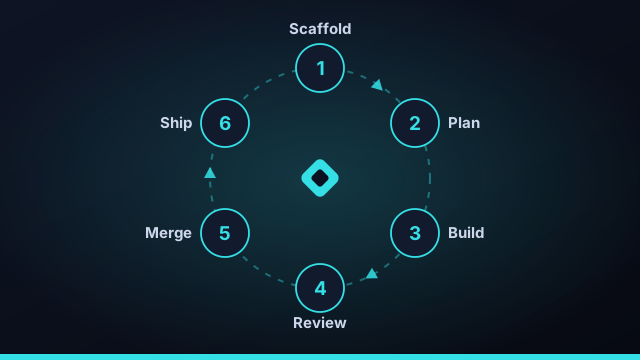
Most "AI builds your app" demos fall apart the moment the app is non-trivial, because one agent trying to do everything in one shot has no way to plan, recover, or integrate. Command Fleet's autonomous build loop is designed around those three gaps. Here's how it works — and, just as important, where you stay in control.
It starts with a sentence
You tell the workspace manager what you want: "build me a waitlist app on Firebase with email capture and an admin list." That's the whole input. From there the loop takes over.
Step 1 — Scaffold from a stack pack
The manager creates the project and scaffolds it from a stack pack — Firebase, Cloudflare, Vercel, Netlify, Supabase, or Fly. This is deterministic setup, not a guess: you get a real project structure, dependencies, and a preview/deploy manifest to build on.
Step 2 — Plan a task graph
Instead of one giant prompt, the build is decomposed into discrete tasks with dependencies between them. "Set up auth" must finish before "gate the admin list," but "style the landing page" can run alongside both. This dependency graph is what makes the rest of the loop safe to parallelize.
The task graph is the unlock. Planning the work as ordered, dependency-aware steps is what lets agents run in parallel without stepping on each other.
Step 3 — Execute in parallel worktrees
A scheduler launches the tasks that are ready — their dependencies satisfied — up to a safe concurrency cap. Each runs in its own git worktree with its own agent, so parallel work never collides. When a task's prerequisites aren't met yet, it waits its turn.
Step 4 — Review and self-correct
When a task finishes, the loop checks it. If your verify gate (build and tests) fails, the task is retried automatically a set number of times. If it still can't pass, the loop stops guessing and leaves it In review for you — with the full history attached. No infinite spinning, no silent failures.
Step 5 — Auto-merge and integrate
A completed, passing branch is merged into the base before dependent tasks start, so each new task builds on integrated work rather than a stale snapshot. If a merge conflicts, that task routes to review instead of being force-pushed.
Step 6 — Ship
With the build assembled, the deploy pipeline can run top-to-bottom — gated until every required credential is in place. Preview and deploy share the same manifest, so what you previewed is what goes live.
Where you stay in control
Autonomy isn't the same as abdication. You set the verify gate and the retry cap. Anything the loop can't resolve lands in your review queue. Secrets never enter a prompt, and deploys wait for explicit credentials. The loop does the typing and the plumbing; the judgment calls stay yours.
One sentence in, a reviewed and deployable app out — with a human at the gate for every decision that matters.
Why most "AI builds your app" demos fall apart
Most viral "watch AI build your app" demos work beautifully right up until the app is non-trivial — and then they unravel for three predictable reasons. First, planning: a single agent trying to do everything in one prompt has no way to break the work into ordered steps, so it loses the thread as the context grows. Second, recovery: when something breaks halfway through, a one-shot run has nowhere to fall back to and either spins forever or silently ships something wrong. Third, integration: there's no mechanism to merge separate pieces of work together cleanly. An autonomous build loop is designed around exactly those three gaps — plan, recover, integrate — which is why it keeps working where a single mega-prompt collapses.
The task graph: the real unlock
If there's one idea that makes autonomous building work, it's the dependency-aware task graph. Instead of one giant prompt, the build is decomposed into discrete tasks with explicit dependencies: "set up auth" must finish before "gate the admin list," but "style the landing page" can run alongside both. Recording those relationships is what lets a scheduler launch every task whose prerequisites are already satisfied — in parallel, in isolated git worktrees — while holding the rest until their dependencies finish. It also makes failure survivable: a single task that can't pass its verify gate stops and routes to review with its history, while unrelated branches of the graph keep moving. The task graph turns "do everything at once and hope" into "do everything that's ready, safely."
Using the build loop on a real project
The autonomous build loop isn't only for greenfield apps. On an existing project, the same loop handles a multi-step change — say, adding billing or migrating a data model — by planning the work as a task graph, running the pieces in parallel worktrees, and merging in dependency order so each step builds on integrated code rather than a stale snapshot. You set the verify gate (your build and tests) and the retry cap; anything the loop can't resolve lands in your review queue. Pair it with a stack pack and the loop can take a change all the way to a credential-gated deploy on Firebase, Vercel, Netlify, Cloudflare, Supabase, or Fly — preview and deploy sharing one manifest so what you reviewed is what ships.
What you can build with an autonomous build loop
The autonomous build loop isn't limited to toy demos. Because it plans a dependency-aware task graph, runs agents in parallel across isolated worktrees, and ships through a credential-gated deploy, it handles real, multi-step work end to end. A few examples of what builders use it for:
- A new app from one sentence — "build a waitlist app on Firebase with email capture and an admin list" — scaffolded, built, reviewed, and deployed.
- A substantial feature on an existing project, like adding billing or an auth flow, decomposed into ordered tasks and merged as it goes.
- A migration — moving a data model or swapping a framework — where the graph keeps dependent steps in order.
- A batch of routine work across a project, like dependency upgrades and the test fixes they trigger, run in parallel.
In every case the pattern is the same: you describe the outcome and set the guardrails — the verify gate, the retry cap, the review queue — and the loop does the planning, typing, and plumbing. With Command Fleet that loop spans six stack packs from Firebase to Fly, so "one sentence to a deployed app" is the default mode, not a party trick.
Frequently asked questions
Does the build loop deploy my app automatically?
It can run the deploy pipeline top-to-bottom, but it's gated until every required credential is in place. Preview and deploy share one manifest, so what you previewed is what ships.
What happens when a task fails?
If your verify gate — your build and tests — fails, the task is retried automatically a set number of times. If it still can't pass, it's left in review with its full history instead of spinning forever.
Do I stay in control, or is it fully hands-off?
You set the verify gate and the retry cap, secrets never enter a prompt, and anything the loop can't resolve lands in your review queue. The loop does the typing; the judgment calls stay yours.
Which stacks can it scaffold and deploy?
Six stack packs — Firebase, Cloudflare, Vercel, Netlify, Supabase and Fly — each giving a real project structure and a shared preview/deploy manifest.
Watch the loop build something
Describe an app and let the workspace manager scaffold, plan, build, review, and deploy it. Free for 7 days.