Most people meet AI coding agents through a chat window, and for a single quick question that's fine. But the moment you have real work in flight, a chat becomes a liability: it's a transcript you have to re-read to remember what's happening. A board fixes that by making the work itself visible.
The chat-window problem
A chat window has no state. To know what's running, what's stuck, and what's finished, you scroll and reconstruct it in your head. With one task that's trivial; with ten across three projects it's a part-time job. The interface is fighting the work.
A board makes work visible
A Kanban board is a state machine you can see. Every task is a card, every card sits in a column, and the column tells you its status at a glance. Nothing to re-read — the board is the status.
Columns as a pipeline
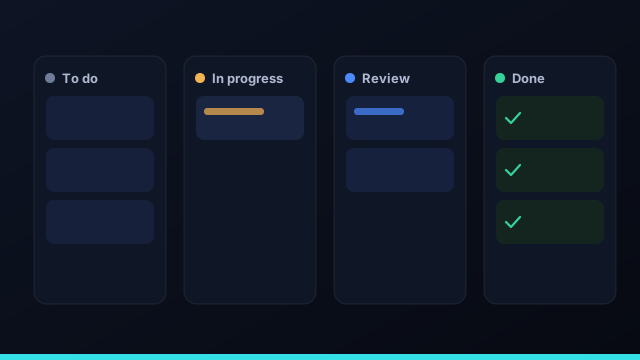
The columns model the actual lifecycle of agent work: To do (queued), In progress (an agent is running), In review (waiting on you), and Done (merged). A card moves left to right as it advances, and the "In review" column is your queue — the one place that needs your attention.
A chat is a transcript of what was said. A board is a picture of what's true right now. For running work, you want the picture.
Agents as cards you assign
On a board, an agent isn't a conversation partner — it's a worker you assign a card to. You pick the agent per card, hit run, and the card carries the model, the status, and the diff. This is the framing that makes delegating to AI feel like managing work instead of chatting about it.
Why it scales to a portfolio
Boards compose. Each project gets its own, and a home dashboard rolls up what's running and what's waiting on review across everything. Whether you run one app or fifteen, "what's the state of the world?" stays a single screen.
Stop chatting with your agents. Put them on a board and watch the work move.
Kanban vs a flat task list for agents
A flat list of tasks tells you what exists; a Kanban board tells you what's happening. That distinction matters enormously when agents are doing the work. With a list, you have to mentally track which item an agent is running, which is waiting on you, and which is done — the same context-juggling that makes managing multiple agents exhausting. A board encodes that state in the layout: a card's column is its status. You see at a glance that three tasks are in progress, two are waiting in review, and yesterday's batch all merged. For AI coding agents specifically, the board also makes the review queue a physical place — the "In review" column — so the one thing that needs your attention is never buried in a list.
Work-in-progress limits and flow
One of Kanban's oldest lessons applies directly to AI agents: limiting work in progress improves flow. It's tempting to dispatch twenty agents at once, but if your review queue fills faster than you can clear it, you've just moved the bottleneck, not removed it. A sensible concurrency cap — tuned to how fast you can review and to your budget — keeps the board flowing instead of clogging. The goal isn't maximum agents running; it's a steady stream of cards moving left to right and merging. Watching where cards pile up tells you where to intervene: a stuffed "In review" column means review is the constraint; a stalled "In progress" task means an agent is stuck and should be re-dispatched, possibly to a different model.
Setting up your board
A good board for AI coding agents needs only four columns: To do for queued tasks, In progress for runs an agent is actively working, In review for finished work waiting on you, and Done for merged changes. Each card carries its task, the agent assigned to it, and — once it runs — its diff. In Command Fleet every project gets exactly this board, and a home dashboard rolls all of them up across your portfolio, so you can run one app or fifteen and still read the state of everything on a single screen. Set it up once and the board becomes the place you manage your agents from, replacing the chat window entirely.
Getting started with a Kanban board for agents
Moving from a chat window to a board is a small shift with a big payoff, and you can do it incrementally. Start by treating each thing you want done as a card rather than a message: write it as a task with a clear outcome, assign an agent, and dispatch it. Watch it move from To do to In progress to In review as it runs, and clear the In review column as your daily habit — that one column is your whole job once agents are doing the typing. Add a second project and you'll immediately feel why the board scales where a chat doesn't: two boards, one dashboard, no lost context. From there, run a few tasks in parallel and let the columns show you where work is flowing and where it's piling up. In Command Fleet every project gets this board out of the box, with a portfolio dashboard on top, so "getting started" is really just dispatching your first card and letting the board do the remembering for you.
Frequently asked questions
Why use a Kanban board for AI agents?
A board makes agent work visible and stateful. Instead of scrolling a chat to remember what's running, you see every task as a card in a column — to do, in progress, review, done — across all your projects at a glance.
How is a board better than a chat window?
A chat is a transcript; a board is a state machine. The board shows what's running, what's waiting on you, and what's finished without re-reading a conversation, and it scales to many tasks and projects at once.
What do the columns mean?
Each column is a stage in the pipeline: To do (queued), In progress (an agent is running), In review (waiting on you), and Done (merged). A card moves across as work advances.
Can I see many projects at once?
Yes. Each project has its own board, and a home dashboard rolls up what's running and what needs review across the whole portfolio, so nothing falls through the cracks.
Put your agents on a board
Command Fleet gives every project a board and rolls the whole portfolio up on one dashboard. Free for 7 days, no credit card.