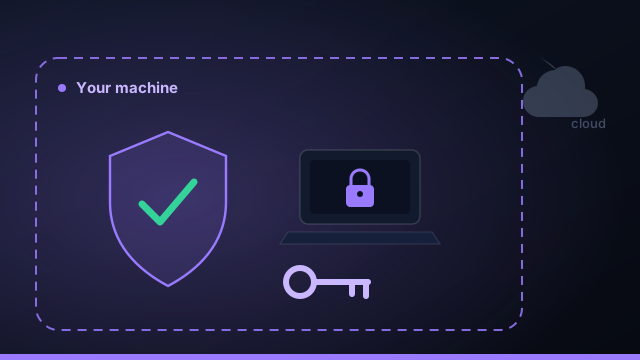
Cloud coding agents feel magical right up until you read the fine print. You paste a repo, an agent on someone else's infrastructure reads all of it, and your code — or your client's code — now lives somewhere you don't control. For a side project, fine. For a business, that's a decision worth making on purpose.
What "local-first" actually means
Local-first means the app, your projects, your data, and your credentials live on your machine. The only things that talk to the outside world are the agent CLIs you explicitly choose — and they talk to their own provider exactly as they would if you ran them in your terminal. There's no extra hop, no third-party server holding your source.
Three reasons it matters
1. Confidentiality you can actually promise
If you do client work, "where does our code go?" is a question you'll be asked. "It stays on my machine; only the AI provider I'm contracted to use sees the snippets it needs" is a much easier answer than explaining a chain of intermediary services.
2. Credentials that never leak into prompts
Agents are powerful and occasionally careless. Keeping API keys in your operating system's credential vault — and keeping a per-project secrets vault that is never included in any prompt — means a chatty or prompt-injected agent can't exfiltrate what it never had.
The safest secret is the one the model never sees. Separate "pointers" the agent should know (repo URL, build folder) from "secrets" it never needs (passwords, tokens).
3. You own your data, including when you leave
Local data means no lock-in. Your projects are git folders; your task history is a file on disk. If you stop paying, you keep everything. That's a very different relationship than a cloud tool where your history lives in their database.
The usual objection: "but I lose autonomy"
The trade people assume is local = manual, cloud = autonomous. That's no longer true. An orchestrator on your machine can plan a build, run agents in parallel worktrees, review and retry, and merge — all locally. You get the fire-and-forget experience of a cloud agent with none of the data leaving home. The one honest trade-off is that your machine has to be on to run; for most builders, that's a price worth paying for control.
What to check before you trust a tool
- Where is the source stored when an agent runs? (Should be: your disk.)
- Where do API keys live? (Should be: the OS vault, not a config file.)
- Can you exclude secrets from prompts? (Should be: yes, by design.)
- What happens to your data if you cancel? (Should be: you keep all of it.)
Local-first vs cloud AI coding, briefly
The honest comparison between local-first and cloud AI coding agents comes down to a few axes. On confidentiality, local-first keeps your source on your disk while cloud uploads it to someone else's infrastructure. On ownership, local-first means your projects are git folders and your history is a file you keep forever; cloud keeps your history in a vendor's database. On autonomy, they're a wash — an orchestrator on your machine can plan, parallelize, review, and merge exactly like a cloud agent. The one genuine trade-off is uptime: a cloud agent keeps working while your machine is off, whereas local-first needs your machine on to run. For most builders shipping real products — and especially anyone doing client work — that single trade is well worth keeping the code at home.
How local-first AI coding actually works under the hood
"Local-first" isn't a marketing label; it's a specific architecture. Your repositories live on your disk, and an agent runs against them in an isolated git worktree. The only thing that talks to the outside world is the AI coding agent's own CLI — Claude Code, Codex, or Gemini — sending the snippets it needs to its provider, exactly as it would if you typed the command in your terminal. There's no extra third-party server in the middle holding your codebase. API keys live in your operating system's credential vault (Keychain, Credential Manager, libsecret), not a plaintext .env in the repo, and a per-project secrets vault is excluded from every prompt so a chatty or prompt-injected agent can't exfiltrate what it never had. That separation — pointers the agent should see, secrets it never needs — is the heart of local-first security.
Local-first for client work and compliance
If you build software for clients, "where does our code go when you use AI?" is a question you will be asked, and the wrong answer loses the contract. Local-first makes the right answer short and true: the code stays on your machine, and only the AI provider named in your agreement ever sees the snippets it needs. That's a far easier clause to satisfy in an NDA or data-processing addendum than explaining a chain of intermediary SaaS tools and where each one stores your data. Running a workspace per client keeps each engagement's code, context, and secrets grouped and separate, so confidentiality is something you can demonstrate, not just promise. For regulated industries and security-conscious customers, that local-first posture is increasingly the deciding factor in which AI coding tools they'll allow at all.
Your local-first AI coding checklist
Before you trust any AI coding tool with real or client code, run it through a short local-first checklist. Each question has a clear "good" answer:
- Where is the source when an agent runs? It should be on your disk — not uploaded to a third-party workspace.
- Where do API keys live? In your OS credential vault, not a plaintext
.envin the repo. - Can you exclude secrets from prompts? Yes — a per-project secrets vault the model never sees.
- Which models see your code? Only the AI provider you explicitly chose, via its own CLI, and only the snippets it needs.
- What happens if you cancel? You keep everything — projects are git folders, history is a file on disk, no lock-in.
- Do you still get autonomy? Yes — plan, run in parallel, review, merge, and deploy entirely on your machine.
If a tool can answer all six the right way, it's genuinely local-first. Command Fleet was built to pass this checklist by design — which is what lets you run autonomous AI coding agents while keeping your code, keys, and data on your own computer.
Frequently asked questions
Does local-first mean I give up autonomy?
No. An orchestrator on your machine can plan a build, run agents in parallel worktrees, review, retry and merge — all locally. The only honest trade-off is that your machine has to be on to run.
Where are my API keys stored?
In your operating system's credential vault, not a plaintext config file. A separate per-project secrets vault is never included in any prompt, so an agent can't exfiltrate what it never sees.
Does my source code get sent to the cloud?
Only the snippets the AI provider you chose needs, sent by that provider's own CLI exactly as if you ran it in your terminal. There's no extra third-party server holding your repo.
What happens to my data if I stop paying?
You keep all of it. Projects are git folders and task history is a file on disk, so there's no lock-in.
Autonomous builds, zero cloud
Command Fleet runs entirely on your machine — keys in your OS vault, secrets never sent to a model. Free for 7 days.