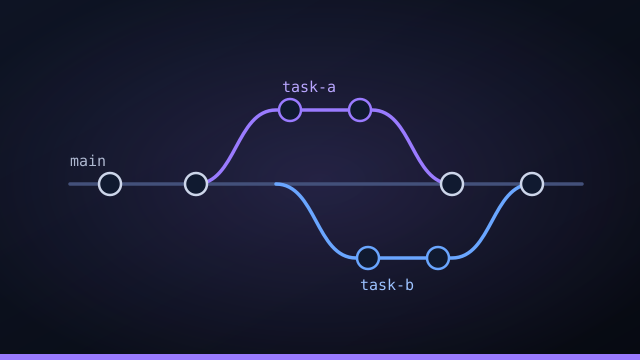
If you want several AI coding agents working at once, the technical unlock isn't a bigger model or a cleverer prompt — it's a quietly brilliant git feature that has been around for years: the worktree. Understanding worktrees is the difference between "one agent at a time" and "a fleet running in parallel without stepping on each other."
What a git worktree is
A git worktree is a second working directory backed by the same repository, checked out to its own branch. One repo can have many worktrees, each with its own independent files on disk. The object database — all your history — is shared, but the working files are separate.
A single command, git worktree add ../task-a -b task-a, spins up an isolated checkout on a fresh branch in seconds — no second clone required.
Why one working directory breaks parallel agents
Picture two agents editing the same checkout at once. One renames a function while the other is mid-edit in the same file; a build kicks off against a half-applied change; a test run picks up someone else's work in progress. A single working directory is a single point of contention, and contention is where parallel work quietly corrupts itself.
One worktree per task = real isolation
Give every task its own worktree on its own branch and the problem disappears. Five agents across five tasks each have a private working directory; none of them can touch another's files or your main tree. If a run goes sideways, you delete its branch and worktree and nothing is lost — the failure is contained by construction, not by hope.
Integrating without conflicts
Isolation is only half the story; the work has to come back together. The trick is to merge in dependency order: a finished, passing branch is integrated into the base before any task that depends on it starts, so each new task builds on integrated work rather than a stale snapshot. When a merge does conflict, route that task to review instead of force-pushing through it.
Disposable by design
Because worktrees share the object database, they're cheap to create and cheap to throw away. Treat them as disposable: one per task, deleted the moment its branch is merged or discarded. That disposability is exactly what makes unattended, parallel runs safe to trust.
By hand vs having it managed
You can absolutely script worktrees yourself — add, run a setup script, merge, remove. The friction shows up at scale: tracking dozens of worktrees across several projects, running the right setup script in each, merging in the correct order, and cleaning up. That bookkeeping is precisely where an orchestrator earns its keep, turning the manual choreography into something you don't have to think about.
Worktrees are what turn "one agent at a time" into a whole fleet at once — safely.
Working with git worktrees: the commands
If you want to try the pattern by hand before letting a tool manage it, the workflow is short. Create an isolated checkout on a fresh branch with git worktree add ../task-auth -b task-auth; that gives you a second working directory backed by the same repository, so an agent can run there without touching your main tree. List what you have with git worktree list, and when a task is merged or discarded, clean it up with git worktree remove ../task-auth and delete its branch. Because worktrees share the repository's object database, each one mostly costs a checkout of the files rather than a full second copy of all history — which is what makes spinning up one per task cheap enough to do dozens of times a day.
Worktree pitfalls to avoid
Worktrees are simple, but a couple of gotchas trip people up at scale. The first is forgetting to clean up: stale worktrees and their branches pile up until git worktree list is a mess; treat them as disposable and remove each as soon as its task merges or is discarded. The second is the shared setup step: a fresh worktree is a clean checkout, so it needs its dependencies installed and built before an agent can do anything — which is why a setup script (like pnpm install) per project matters. The third is integration drift: if branches live too long, they diverge from main and conflict; keeping tasks small and merging in dependency order keeps that rare. None of these are hard, but at a dozen worktrees across several projects they're exactly the bookkeeping you'd rather not do by hand.
Worktrees across a whole portfolio
One repo with a few worktrees is easy to manage manually. A portfolio — several projects, each with multiple agents running at once — is where an orchestrator earns its keep. Command Fleet creates a worktree per task automatically, runs the right setup script in each, dispatches the task to the agent you chose, merges finished work in dependency order, routes conflicts to review instead of forcing them, and cleans up the worktree when the task is done. You get all the isolation and parallelism benefits of git worktrees — many AI coding agents working at once without ever colliding — without personally tracking dozens of branches across projects. The plumbing that makes parallel agents safe runs in the background, and you stay focused on reviewing diffs and shipping.
Git worktrees in your daily workflow
To make the idea concrete, picture a normal morning running AI coding agents with worktrees underneath. You open your board and dispatch three tasks across two projects; each one spins up its own git worktree on a fresh branch, so three agents start working in parallel without touching your main checkout or each other. While they run, you keep editing in your usual editor on the main worktree — completely undisturbed, because the agents are off in their own directories. As each task finishes, its branch passes the verify gate and lands in your review queue; you read the diff, merge in dependency order, and the worktree is cleaned up automatically.
That's the whole point of worktrees for parallel AI agents: the isolation is invisible day to day, but it's what lets you safely have five things in flight at once. Done by hand, you'd be running git worktree add and remove and tracking branches constantly; with an orchestrator like Command Fleet, the worktree-per-task lifecycle — create, set up, run, merge, clean up — happens in the background, and you just see tasks moving across a board. The fifteen-year-old git feature is the quiet engine; the board is what you actually look at.
Frequently asked questions
What is a git worktree?
A git worktree is a second working directory backed by the same repository, checked out to its own branch. You can have many worktrees from one repo, each with independent files, so work in one never disturbs another.
Why do AI agents need worktrees?
Because multiple agents editing one working directory would clobber each other. Giving each task its own worktree and branch lets agents run in parallel safely — and a bad run is discarded by deleting its branch, with nothing lost.
Do worktrees use a lot of disk space?
Less than full clones — worktrees share the repository's object database, so each one mostly costs a checkout of the files, not a second copy of all history.
How do parallel branches get merged back together?
In dependency order: a finished, passing branch is merged into the base before dependent tasks start, so each builds on integrated work. If a merge conflicts, that task routes to review instead of being forced.
Run agents in parallel, safely
Command Fleet gives every task its own git worktree and merges in dependency order — no clobbering, no lost work. Free for 7 days, no credit card.