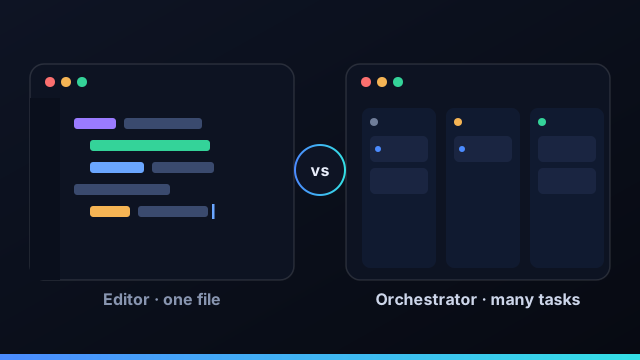
Cursor and Command Fleet get filed under the same label — "AI coding tools" — but they answer different questions. Cursor answers "how do I write this code faster?" Command Fleet answers "how do I run a dozen changes across a portfolio without losing the thread?" Understanding that split makes the choice (and the combination) obvious.
Editor vs orchestrator: the real difference
An AI editor puts a model inside your text editor: autocomplete, inline edits, a chat that can see the file you're in. You stay at the keyboard, accepting or rejecting suggestions keystroke by keystroke. An orchestrator treats a coding agent as a worker you hand a task to. It runs that agent in an isolated git worktree, in parallel with others, and gives you a board, a diff, and a merge button. One optimizes the act of typing; the other optimizes running many units of work at once.
Where an AI editor like Cursor shines
Hands-on, exploratory work is the sweet spot. When you're spiking a feature, debugging something subtle, or shaping code you want to feel out line by line, a tight editor loop is unbeatable. You see every change as you make it and stay in full control of the details.
Where an orchestrator shines
The moment you have several things in flight — a bug here, a feature there, a dependency bump across three repos — an editor starts to strain, because you can only have your hands in one file at a time. An orchestrator runs those as parallel tasks, each isolated, and collects them in a single review queue. It also goes further than any editor: it can scaffold a project, plan a multi-step build as a task graph, and deploy.
Rule of thumb: reach for the editor when the work is in your head and your hands; reach for the orchestrator when the work is a list you'd rather delegate and review.
You can use both
This isn't an either/or. Both work against the same git repositories, so nothing locks you in. A natural rhythm: explore and prototype in your editor, then hand the well-scoped, repeatable pieces to the orchestrator to run in parallel while you keep thinking. You review its diffs the same way you'd review a teammate's pull request.
Side by side
| Capability | Command Fleet | AI editor (e.g. Cursor) |
|---|---|---|
| Hands-on, line-by-line editing | Review diffs | Yes |
| Run many tasks in parallel | Yes | One at a time |
| Portfolio of projects | Workspaces | Per window |
| Isolated worktrees + review queue | Yes | No |
| Plan → build → deploy | Yes | No |
Cursor helps you write the next line. Command Fleet helps you run the next twenty tasks.
Using Cursor and Command Fleet together
The most productive setup for many builders isn't choosing between an AI editor and an orchestrator — it's using both for what each does best. Keep Cursor (or any AI editor) open for the hands-on work: exploring an unfamiliar corner of the codebase, debugging something subtle, shaping code you want to feel out line by line. Hand the rest to Command Fleet: the well-scoped, parallelizable tasks you'd rather delegate and review than type. Because both operate on the same local git repositories, there's no lock-in and no friction moving between them — you might be editing a tricky function in Cursor while three Command Fleet agents work other tasks across other projects in isolated worktrees. The two tools sit at different layers, so they complement rather than compete.
Signs you've outgrown an editor-only workflow
An AI editor is the right tool right up until a few signs appear. You're flipping between windows because you have work in flight across several projects at once. You find yourself wishing you could kick off a task and review the result later instead of steering every keystroke. You want to run the same task on Claude Code and Gemini and compare, but your editor is tied to its own models. You're hand-managing branches because parallel work keeps colliding. And you wish "build and deploy this" were one button rather than a separate pipeline. Each of those is a signal that the work has moved up a level — from editing one file to orchestrating many tasks — which is exactly the level an agent orchestrator like Command Fleet operates at.
Trying Command Fleet alongside your editor
You don't have to switch anything to try it. Install Command Fleet, point it at a git project you already have open in your editor, connect your Claude Code, Codex, or Gemini subscription, and dispatch one small task — say, "add a test for this edge case." You'll see the run happen in an isolated worktree, review the in-app diff, and merge with one click, all without disturbing your editor session. From there you can decide which kinds of work belong in the editor and which belong on the board. It's a free 7-day trial with no credit card, and since it's bring-your-own you use the AI subscriptions you already pay for.
The verdict: it's not either/or
The honest verdict on Command Fleet versus Cursor is that the question is slightly wrong. They aren't competing for the same job. Cursor is an outstanding AI editor for the moments your hands are on the code — exploring, debugging, shaping a function. Command Fleet is an orchestrator for the moments you'd rather delegate and review — many tasks, across many projects, run in parallel and shipped. The builders who get the most out of AI coding don't pick a side; they use the editor for hands-on work and the orchestrator for everything they can hand off. If you're choosing a single tool, choose by the work you do most: heads-down in one repo, lean on an editor; running a portfolio and directing agents, you want an orchestrator. And if you do both, the good news is they sit at different layers and work on the same git repositories, so you lose nothing by using both.
Frequently asked questions
Is Command Fleet a Cursor alternative?
Not exactly — they sit at different layers. Cursor is an AI-native editor for hands-on coding in one file or repo; Command Fleet is an orchestrator that dispatches agents across many projects, runs them in isolated worktrees, and reviews and merges the results. Many builders use both.
What's the difference between an AI editor and an agent orchestrator?
An AI editor keeps you in the loop keystroke by keystroke in a single project. An orchestrator treats agents as workers you assign tasks to, runs several at once across a portfolio, and gives you a board, a review queue, and deploys.
Can I use Cursor and Command Fleet together?
Yes. A common workflow is to do exploratory, hands-on edits in an editor and hand off well-scoped, parallelizable tasks to the orchestrator. They operate on the same git repositories, so there's no lock-in either way.
Does Command Fleet have its own editor?
Command Fleet focuses on orchestration — dispatch, isolated runs, an in-app diff, review, and deploy — and lets the coding agents do the editing. You review changes as diffs rather than typing them yourself.
Run your portfolio, not just one file
Command Fleet dispatches agents across every project, in isolated worktrees, with a review queue and deploys. Free for 7 days, no credit card.