Factory.ai brings autonomous engineering agents to real work. If you want that autonomy local-first, with your own model subscriptions and deploys to many platforms, Command Fleet runs the loop on your machine and the whole portfolio on one board.
Command Fleet is a local-first, agent-agnostic AI coding agent orchestrator. Where Factory.ai is best known as a cloud coding agent, Command Fleet runs Claude Code, Codex, and Gemini across a whole portfolio of projects — on a Kanban board, in isolated git worktrees, with a review gate and built-in deploys to six platforms. This guide is an honest, Factory.ai-versus-Command-Fleet comparison: what Factory.ai is genuinely great at, and the specific places a portfolio-scale, autonomous AI coding orchestrator goes further.
What Factory.ai does well
Factory.ai’s autonomous "droids" take on substantial engineering tasks and bring enterprise polish to agent workflows.
None of that goes away by choosing Command Fleet — and for hands-on work in a single project, Factory.ai may well stay open in another window. The point of this comparison runs the other direction: the specific capabilities you reach for once AI coding becomes a portfolio of projects to run rather than one file to edit.
When to consider a Factory.ai alternative
Factory.ai is a capable way to delegate coding work, and async cloud agents are genuinely convenient. You start weighing a Factory.ai alternative when keeping your source on your own machine matters for confidentiality or client work, when you want to use more than one model rather than a single built-in one, and when you are running enough projects that you need a Kanban board and a review queue instead of one task at a time. Command Fleet brings that autonomy local-first, across a whole portfolio of AI coding agents.
Run a whole portfolio, not one project
Command Fleet organizes work as organizations → workspaces → projects → tasks, with each project on its own Kanban board and a home dashboard that rolls up what is running and what is waiting on review across everything. Whether you are a solo founder shipping seven side projects or an agency with a workspace per client, the entire portfolio of AI coding agents lives on a single screen instead of a dozen scattered browser tabs and terminal windows.
That portfolio layer is what most AI coding tools leave out. You can dispatch a feature to one project while a refactor runs in another and a dependency bump runs in a third, then clear them all from one cross-project review queue — the kind of parallel throughput that is impossible when you can only work one repository at a time.
Bring your own agents — Claude Code, Codex, Gemini
Command Fleet is agent-agnostic: dispatch any task to Claude Code, Codex, or Gemini — chosen per task, with an optional per-run model override — on your own AI subscriptions. You route the strongest model to a gnarly refactor and a cheaper, faster one to boilerplate and test scaffolding, optimizing each task instead of compromising across all of them.
Because it is bring-your-own, you pay the model providers directly and never a markup on every run, and you are never locked to a single vendor. If one agent gets stuck, re-dispatch the same task to another and compare the diffs — a fresh perspective often breaks the logjam.
An autonomous build loop
Describe an app to the workspace manager and the autonomous build loop scaffolds it from a stack pack, plans a dependency-aware task graph, runs the ready tasks in parallel across isolated worktrees, retries failures, merges finished branches, and can deploy. It is the difference between an assistant that edits the file you are in and an orchestrator that turns one sentence into a planned, built, reviewed, and shippable app.
Crucially, autonomy is not abdication: you set the verify gate and the retry cap, anything the loop cannot resolve lands in your review queue with its full history, and deploys wait for explicit credentials. The loop does the typing and the plumbing; the judgment calls stay yours.
Local-first by design
Command Fleet is local-first: your projects, data, and API keys never leave your machine, keys live in your operating system credential vault, and a per-project secrets vault is never included in any prompt. Your code — and your clients’ code — stays on your computer rather than uploaded to someone else’s servers, which turns confidentiality and NDAs into a one-sentence answer.
Local-first does not mean manual: an orchestrator on your own machine can plan a build, run agents in parallel, review, retry, and merge exactly like a cloud agent. And because everything is a git folder on disk, there is no lock-in — stop paying and you keep all of it.
Running a portfolio of AI coding agents
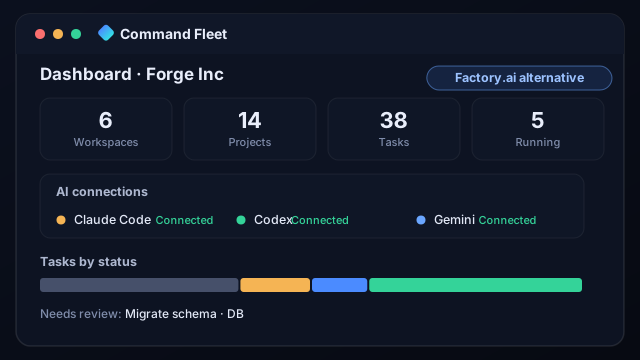
Most AI coding tools, Factory.ai included, are organized around one thing at a time — one file, one repo, one chat, one task. Command Fleet is organized around many. Each project gets its own Kanban board with To do, In progress, In review, and Done columns; a home dashboard rolls up how many workspaces, projects, and tasks you have, which AI agents are connected, your tasks-by-status, and what is waiting on review across the entire portfolio. You can even fan a single task out to two different agents, compare the diffs, and merge the better one. For anyone running more than one product, that portfolio view is the difference between feeling on top of the work and drowning in browser tabs — and it is the layer an editor or a single-task agent simply does not have.
Switching from Factory.ai to Command Fleet
- Install Command Fleet and create a workspace — one per client or product line works well.
- Add your projects by pointing Command Fleet at the same local git folders you already use, and set a setup script (such as
pnpm install) so fresh worktrees build cleanly. - Connect your agents — your Claude Code, Codex, and Gemini subscriptions — then dispatch a first small task to see the in-app diff, the verify gate, and the one-click merge in action.
Because your projects are just git repositories on disk, there is nothing to export and nothing locked in: moving from Factory.ai is mostly a matter of opening the folders you already have and pressing Run.
Command Fleet vs Factory.ai at a glance
| Capability | Command Fleet | Factory.ai |
|---|---|---|
| Autonomous tasks | Build loop | Yes |
| Portfolio board | Workspaces | Per task |
| Bring your own model | Claude · Codex · Gemini | Built-in |
| Local-first | Yes | Cloud |
| Isolated git worktrees per task | Yes | Varies |
| Cross-project review queue | Yes | Varies |
| Free 7-day trial, bring your own model | Yes | Varies |
Who Command Fleet is for
Command Fleet tends to win over the same people who try Factory.ai and then realize they have outgrown working one project at a time: solo founders shipping a portfolio of apps who need real parallelism without losing the thread; agencies and freelancers who run a workspace per client and have to keep each client’s code confidential and cleanly separated; indie hackers who want an autonomous build loop on their own Claude, Codex, or Gemini subscriptions with no markup; and small teams who want isolated git worktrees, a review gate, and built-in deploys without standing up their own infrastructure. If any of those describe you, Command Fleet is well worth a look as a Factory.ai alternative.
Frequently asked questions
Is Command Fleet a Factory.ai alternative?
Yes. Command Fleet is a local-first, agent-agnostic orchestrator: it runs coding agents across a whole portfolio on a board, in isolated git worktrees, with review and built-in deploys. It is a strong Factory.ai alternative when you want to run many projects and choose your own model.
What is the difference between Command Fleet and Factory.ai?
Factory.ai’s autonomous "droids" take on substantial engineering tasks and bring enterprise polish to agent workflows. Command Fleet adds a portfolio board, your choice of Claude Code, Codex or Gemini per task, an autonomous build loop, isolated runs with a review gate, and deploys to six platforms — all local-first.
Can I use my own AI subscription with Command Fleet?
Yes — Command Fleet is bring-your-own. Connect your Claude, Codex, and Gemini subscriptions, choose the agent per task with an optional model override, and pay the providers directly with no markup on model usage.
Do I bring my own AI subscriptions?
Yes — connect your Claude, Codex, and Gemini subscriptions and pay the providers directly, with no resale markup.
Is Command Fleet free to try?
Yes — there is a free 7-day trial with no credit card. Because it is bring-your-own, you use your existing Claude, Codex, or Gemini subscriptions, so you are never double-charged for model usage.
Where does my code go when I use Command Fleet?
It stays on your machine. Command Fleet is local-first: projects, data, and API keys live on your computer, secrets are kept out of every prompt, and only the agent CLI you choose talks to its provider — there is no third-party server holding your repository.
If Factory.ai is where you started, Command Fleet is where you go when AI coding becomes a fleet to run, not a file to edit.
The Factory.ai alternative, on your machine
Command Fleet is portfolio-scale, agent-agnostic, autonomous, and 100% local. Free for 7 days, no credit card.